
Unformatted SQL is a nightmare to debug. Whether you’re working with legacy code or complex joins, proper formatting is essential for collaboration and maintenance. Here are five tips to clean up your SQL, plus a tool to do it automatically.
1. Capitalize Keywords
Standard practice is to capitalize SQL keywords (SELECT, FROM, WHERE) and use lowercase for table and column names. This creates a visual hierarchy that makes the query easier to scan.
2. Consistent Indentation
Indent subqueries and JOIN conditions. This helps you see the structure of the query at a glance.
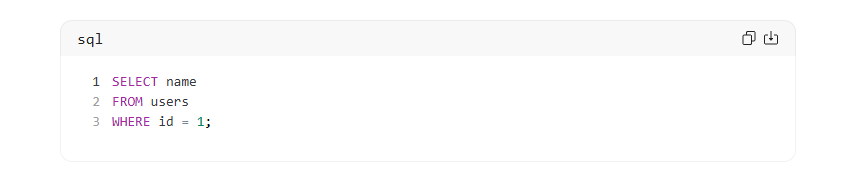
Bad Example: select name from users where id=1
Good Example:
Use Our SQL Formatter
Don’t format manually. Paste your messy code into our SQL Formatter to instantly beautify it with proper indentation and capitalization.
3. Use Aliases for Tables
When joining multiple tables, always use aliases. It reduces typing and improves readability.
SELECT u.name, o.total FROM users u JOIN orders o ON u.id = o.user_id;
4. Avoid Select *
Always specify the columns you need. SELECT * retrieves unnecessary data, slowing down your application and making the query harder to understand.
5. Format JSON and YAML Too
Modern databases often store JSON data. Keeping your configuration files clean is just as important. Use our JSON to CSV tool for data export and our Developer Tools Category for other formatting needs.
Conclusion
Clean code saves time. Bookmark our SQL Formatter and make readable queries a habit.